I don’t think the internet sucks entirely. But it’s hard to avoid the fact that many online spaces seem to have decided that they hate users. It’s 2026 and fun and joy have simply been banned from the internet overlords’ specs. Maybe this all started when Facebook killed the Poke? Who knows.
I like the internet. And I don’t really agree with it turning into a boring place. So here is a collection of things I do on the internet that make it cool again. Small habits you can get inspiration from to take back control on how you experience browsing the web and maybe inspire you to take part in rewilding the internet.
So if you find yourself brain-rotted by endless scrolling on social media, depressed by the news cycle of major outlets or emotionally numbed by reposts of the same variation of karma-farming questions on Reddit, you’re in the right place! I hope this post will be useful.
Using an RSS reader and curating curators
If you don’t know what RSS is, think of it as the grandmother of all internet publish-subscribe (pub/sub) models. Anyone can publish content and “advertise” it through an RSS feed, and anyone can subscribe to this feed. It’s like social media except you don’t need a Facebook account to participate. All you need is an RSS reader to subscribe to feeds and see new publications in one place.
RSS is how I build my own curated “timeline”. It’s less a social media feed and more of a personalised newspaper that only features authors and publications I selected, as Molly White puts it. It tends toward “slower content”, aka content that requires a bit more time to read, because it’s mostly composed of small blogs where people post between one and four times a month.
My favourite part about RSS is that it allows me to be deliberate about what I read. Rather than reading the first thing I see on mastodon or the latest newsletter in my inbox, I can pick a category (my feeds are sorted into different folders), a source, and check their latest posts. Depending on how I feel, I can easily pick long, detailed and well-crafted pieces or just enjoy silly games or a comic strip (more on that below).
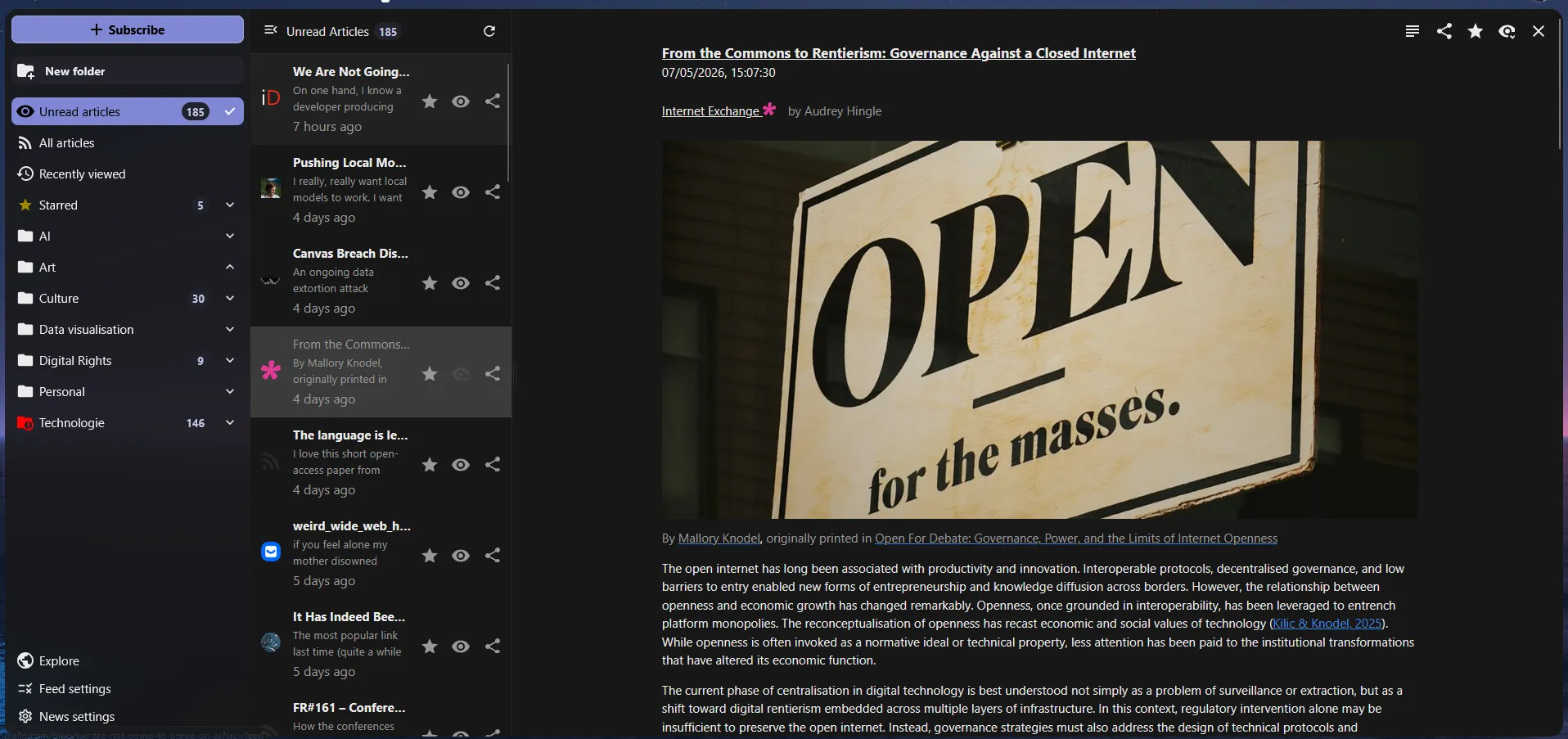 A screenshot of what my RSS reader looks like
Tools
There are tons of RSS readers out there. They are fundamentally very simple pieces of software and on mobile you’ll find dozens in your app store. If you want synchronisation across devices, they will usually require some sort of account so that you can login and access your feed.
Personally, I use the Nextcloud News plugin as I already have a Nextcloud instance. There is a compatible mobile app that is simple enough and gives me everything I need when on my phone. What I like about Nextcloud News, outside of the fact that it plugs into software I already use, is the ability to create folders, the fact that it flags dead feeds (because the site is down or the RSS feed moved) and the ability to “favourite” articles I particularly enjoyed. The built-in reader is also usually up to the task and I only visit sites when the RSS feed is incomplete, or when I want to enjoy the design of the site.
Most people won’t have a Nextcloud instance and for those I recommend checking Inoreader. Avoid Feedly. In general I would suggest trying and testing a few options to find what suits you. The best part about RSS as an open protocol is that it’s dead simple to switch service (did someone say data portability?): simply export your feeds and import them in another app.
Finding sites to follow
To populate my feed, I follow a simple rule: every time I find a blog post I enjoy, I subscribe to its RSS feed. It’s the best way to see content I know I’m likely to enjoy that would otherwise be buried in the torrent of social media posts. Of course, once in a while I’ll remove a feed if I find myself always ignoring its content.
I end up on random people’s sites mostly through other means:
- Tech content aggregators like Hacker News and Lobsters
- Blog aggregators like Minifeed, Microblog, Bear Discover and Indiweb (click “visit a random site” )
- Alternative search engines like Marginalia and Kagi small web
Additionally, I’ve moved from subscribing to newsletters to following their RSS feed instead, as most will offer the option. My inbox truly liked that. While I’m not really doing that at the moment, you can also subscribe to Tumblr, Mastodon, Bluesky and Youtube accounts. You can even subscribe to Google search alerts! RSS has been around a while and many sites will offer a feed, even it can be a bit hidden.
On this point, any decent RSS reader will figure out where the RSS feed is from the main URL, so just copy that and let the machine do the work
Here are a few blogs I enjoy, in no particular order and covering fairly different topics:
- Weird wide web hole: My favourite type of newsletter, random link to weird, unexpected and poetic internet places. This is an endless source of other sites to add to my reader
- Do flamingos know they’re pink: Tara Tarakiyee’s blog, covering internet infrastructure, digital sovereignty, decentralisation and with the occasional fiction
- The internet Exchange: Weekly newsletter about internet governance, digital rights, privacy and security
- Lux Magazine: Social feminist magazine for the masses. Articles come in batches.
- マリウス: Marius’ (?) blog. Random posts about photography, tech, privacy, keyboards. Beware the tab preview if you dare visit with javascript enabled…
- The Prompt: My ex-colleague Lucy Purdon fantastic take on the state of the internet. This is a substack newsletter but you can follow any substack rss feed by adding /feed to the URL
- BouletCorp: I used to follow dozens of webcomics 15 years ago. I’m trying to find them again now but Boulet’s blog is one I never forgot about.
- Terry Goider: Posts about RSS, the internet and design with lovely animations (or not if you don’t want them)
- Smitten Kitchen: Deb’s lemon bar is my favourite dessert ever. You might find something to your taste too
Joining communities
RSS feed are awesome but they can feel a little one=sided (especially if you don’t have your own little internet garden to post). Social media once promised to connect us but have turned into cash-making machines have forgotten their primary use case.
I find interesting communities elsewhere these days. First on Mastodon, the site that replaced Twitter for me years ago. Hashtags and lists are a great way to get started there, and you’ll find tons of dedicated blogs to guide you if you want to join the Fediverse. Other ActivityPub-based services also offer a good way to join online communities. For example: Some Lemmy instances make for decent alternatives to Reddit. Bookwyrm instances offer a good alternative to Goodreads if you’re into reading books.
Once in a blue moon I’ll join an up-and-coming alternative “social network” just to be exposed to content that is outside of my bubble. Recently I joined Perfectly Imperfect, a site that claims to be a “social magazine” where people share their discoveries and ask for suggestions. It’s all about recommendations and I found some really good music for a second!
I also find joining Matrix rooms or discord server to be a good way to replace the old forums where I used to hang out (although some of those still exist and I cherish them). Some time ago, I joined Bellingcat’s discord and joined the book club. It led me to read Cobalt Red which I would have never done otherwise (note: it was incredibly depressing and heartbreaking book but I highly recommend it nonetheless).
Following the white rabbit
Now onto behaviour. One way I make my internet journeys more enjoyable is by embracing randomness and being curious. Enjoyed a random post shared by someone? I’ll check who the author is, what things they are interesting in, what other things they might have published. Hear someone mention a podcast, a magazine, a forum? I’ll check those too, dig until I find myself bored or with too many articles in my to-read pile.
Generally speaking, I follow the white rabbit. I click Wikipedia sources, check RSS aggregators for random articles that cover topics I know nothing about, roll the dice on Kagi small web search, check Wikipedia’s today’s article (I cannot recommend the Wikipedia mobile app enough by the way, it’s my favourite app ever, go install it now). Every opportunity I have to go one click further I do. It might be a link to a thesis on a CV, a recommendation by someone overheard in a video, a trending hashtag on Mastodon. Whenever I see something I haven’t seen before, I try to explore it a little bit, or take note so I can return to it later.
Tons of people are still putting time and effort into maintaining a small corner of the internet where they post their thoughts, the things they create, their observations and challenges. Finding those in a time where AI slop is shoved down users’ throats on dominant platforms, and where the internet is quickly turning into zombie AI territory, is a treasure that should be cherished through curious exploration. A stranger’s reflection on their struggle is worth a thousand AI generated posts on LinkedIn.
Big Tech
I’ll be lying if I said I don’t use major social media platforms. I still do. A little bit of Instagram to see what my friends are up to. Some TikTok for the random videos or discovering music. There is amazing content that is unfortunately only published on those platforms right now, and I don’t really want to forbid myself from accessing it. Maybe one day Loop and PixelFed will offer great content, but we’re not there yet.
Since those platforms also have well known issues, from their addictive nature to the problematic content they can sometimes serve, my attitude is simple: I have a timer on these apps (20min max per day). I also save/like the content I find interesting and will often spend this time checking my saves, for example to learn a new guitar riff.
On Youtube, I also have a simple, anti-recommender algorithm approach: subscribe only to channels I like and find interesting (usually recommended by real people), disable recommendations and only visit the “subscription” page. No notification, no recommendation, just what I want to see. Kind of like my approach to RSS feeds. I might not find new content often but in a sense that’s a good way to not spend too much time on the platform. I also hop on random Peertube instances sometimes and have found some really good content that I subscribed to from my mastodon account.
Habits
The last thing I want to mention is habits. It’s easy to fall into a routine and always check the same site, the same app, the same subreddit, and find yourself numbed by the same content over and over again. This can even happen with RSS feeds and small sites. Overcoming this is both simple and hard: once I identify a habit I don’t enjoy, I try to replace it.
Automatically unlocking my phone and going toward a certain app? Remove the app and put another app I want to use in its place. Reflexively typing a URL? Block the site. There are many small ways you can nudge yourself to eliminate small habits you don’t enjoy. I’m not saying it’s easy, but if you’ve curated a nice selection of RSS feeds, it might be easier than you think to replace Reddit/Insta/FB with a collection of small blogs you’ll enjoy reading.
And of course, this wouldn’t be a proper blog post about the internet if I didn’t tell you to go touch some grass.